
You must generate your own API Key to use Google Map, Now it's Super Easy, Please go to WP Google MapQuick Setup and follow easy steps, Documentation


Enjoying SchedulePress? Why not check our Pro version which will enable auto schedule, multi social account share and many more features! [Learn More]

Your yearly post volume
Daily Limit of 500 posts reached!
Your monthly X post volume
Daily Limit of 20 X posts reached!
Your daily limit for posting automatically has been reached.
Please make sure that you only use one plugin for setting meta tags so that the networks can display the link preview of your post correctly.
You will find a checklist for setting Open Graph tags in the Open Graph Tag guide.
RATE IT!
Hi, we noticed you just shared your 5350. blog post with Blog2Social - that's awesome! Could you please do us a favor and give it a 5-star rating on WordPress? Just to help us spread the word and boost our motivation.
Share Posts
 We updated our Privacy Policy
Social Media Metrics
You can now track the performance of your post directly in Blog2Social, and you can test it exclusively and for free!
Benefit from the new Social Media Metrics and use the analysis of your social media posts for your further social media strategy.
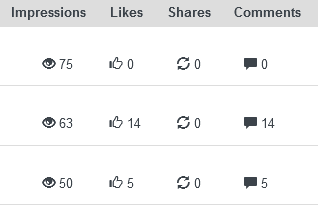
Start your free trial for Social Media Metrics
We hope you enjoy analysing your posts!

Something went wrong with your request - please try again or re-authorize your assistini connection.
Please choose at least one network.
Your authorization has expired. Please re-authorize your Assistini account.
The content of your Wordpress post is empty!
Enter a content of your Wordpress post. Alternatively, you can enter content directly into the input field. Assistini AI will then create suggestions for your social media post.
Your video description is empty!
Enter a description for your video in the Media Library. Alternatively, you can enter content directly into the input field. Assistini AI will then create suggestions for your social media post.
You reached the maximum of generated words for your plan.
Live preview

Blog2Social now

 Video
Video
 Post
Post
 Job
Job  Event
Event  Product
Post Automatically
Save time – Blog2Social posts automatically for you
Save time and publish your content automatically – no manual sharing needed. With an upgrade to Blog2Social, your posts practically run themselves:
- Automatically publish and share your posts
- Use the best posting times for each network
- Re-share older posts
Re-Share Post
Do you want to post your blog article again?
With Blog2Social SMART, PRO, or BUSINESS, you can share your posts multiple times – automatically, scheduled, and at the best time for each network.
- Post content multiple times to increase your reach
- Best Time Manager: automatically publish at the optimal time
- Revive old posts and reach new audiences
App Limit Reached
Expand your Blog2Social – more apps, more reach, more flexibility
Expand the number of apps you can connect: Smart(1), Pro(3), Business(5).
- Connect multiple Pinterest accounts to your apps with Blog2Social.
- Schedule your content in advance & automatically.
- Use custom image and post formats.
Post Management
Would you like to edit a scheduled post?
- Keep an overview of your posts and schedules in the calendar
- Automatically post and schedule your content
- Flexibly reschedule or repost your content
Unfortunately, this isn’t possible in the Free version – but with SMART, PRO, or BUSINESS you have full control over your content:
Scheduling
You want to plan your posts?
With an upgrade to Blog2Social, you can easily schedule your social media posts – once, multiple times, or on a recurring basis.
- Schedule posts for specific dates in the calendar
- Automatically share recurring or evergreen posts
- Use the Best Time Manager for maximum reach
Best Times Manager
Plan your social media posts at the perfect time – automatically.
The Best Times Manager automatically publishes your posts when your community is most active. This way, you achieve more reach and engagement – completely effortlessly.
- Automatic selection of the optimal publishing times
- More visibility and engagement for your posts
- Ideal for repeat scheduling & time savings
Best Times Manager
Automatically Use the Best Times – for Greater Reach with Your Posts
With the Best Time Manager, Blog2Social automatically schedules your posts at the best times — individually for each social network. This way, you reach your followers when they are online and most likely to see your posts.
- 1. In the preview editor, open the “Load Best Times” tab to automatically apply the recommended times.
- 2. Or click “Load My Time Settings” to use your own preferred posting times.
- 3. You can edit all times in the preview editor and save them as your default settings.
Tip: With customized posting schedules for each network, you can create your optimal social media rhythm — effortlessly.
Edit Social Media Preview
This is how your post appears on social media
Adjust how your post is displayed across networks:
- Post image
- Title
- Description
Important to know
Blog2Social automatically writes these meta tags into the Open Graph (OG) tags of your WordPress post. This ensures that users see the exact preview you define.
If your preview does not appear the way you set it, click here:
Select a custom post format for your social media posts (PREMIUM feature)
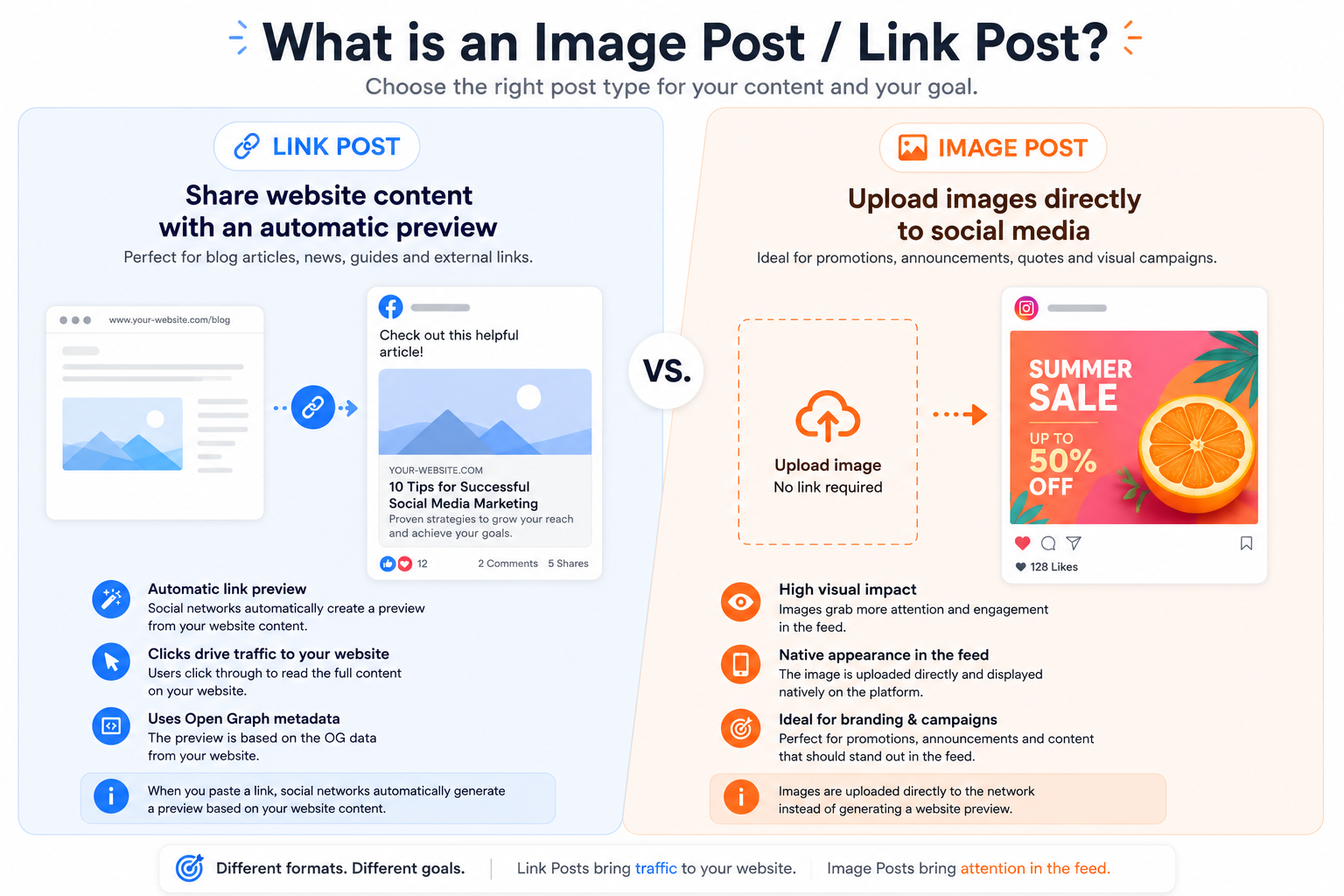
1) Link Post
A link post will display the title of the original post, the link address, the first one or two lines of the article, and the original image linked to the post. Clicking the image will direct the user to the linked website.
2) Image Post
An image post will display the cover image of the linked website or post and add it to the library of the selected social media networks. Blog2Social will automatically include a link to the website in the text field of the social media post. You can customize the link for each network.Selecting an individual post format for your social media posts is only one of Blog2Social Premium features. Here are some more things you can do with Blog2Social Premium:
Select frames or crop, flip and rotate images
Create your own custom social media post templates
Auto-post new and updated blog posts
Create and share social media posts from any other content
Auto-schedule your posts with the Best Time Manager
Publish and share videos to your social media networks
and many more!
Did you miss something?
Why Retweets?
If Retweets are enabled, every Original-Tweet you schedule in this step will be retweeted by the selected X accounts. If, for example, 3 Original-Tweets are scheduled, every single Tweet will trigger a Retweet for the selected X accounts.
Define X post content
Blog2Social: Social Media Auto-Posting
Share your blog posts with the Auto Poster: Your blog posts will be shared automatically on your social media channels as soon as you publish or update a new post. You can also choose to autopost scheduled blog posts as soon as they are published. Learn how to set up auto posting for your blog posts
Blog2Social: Social Media Auto-Posting
Share imported posts with the Auto Poster: Posts that you import via RSS feeds and plugins can be shared automatically on your social media channels. Learn how to set up auto posting for imported posts
Transfer Auto-Poster settings to other users (Business):
You will get more information on how to assign the Auto-Poster settings in the Auto-Poster guide.
Blog2Social: Re-Share Posts
Keep your social media feed updated automatically with your best content and save valuable time by reviving your evergreen content regularly. Automate your resharing process with Blog2Social, so you can use your time to create new content and interact with your community. More information
X Threads
Tip: To define threaded posts as the default setting for your tweets, activate this function in your post templates for X.
Change image, title and description for your post on this network
Do you want to mark this post as published ?
You've reached your daily posting limit!
You've reached your posting limit!
Scheduling
You want to plan your posts?
With an upgrade to Blog2Social, you can easily schedule your social media posts – once, multiple times, or on a recurring basis.
- Schedule posts for specific dates in the calendar
- Automatically share recurring or evergreen posts
- Use the Best Time Manager for maximum reach
You want to create image posts with any image from your media library?
You want to create text posts?
With Blog2Social you can share your WordPress posts and pages as well as create your own social media posts to share any content based on text, links, images, or video links, or even third-party content from any sources. This enables you to manage all your social media content in one place directly from your WordPress dashboard. Schedule and share link posts, text posts, image posts, and video posts (video links, for example from Youtube) and provide your followers with the best content-mix on your social media networks.
Unlock Blog2Social Premium Pro to create and share image posts, video links, and text posts from any source.
Share image posts:
Grab more attention for your content with photos, videos, or infographics.
Share images to get them into the Google image search to further increase your outreach and traffic from search engines.
Share text posts:
Share pure text messages and personal comments with your followers and readers.
Use hashtags, @mentions, or emojis to share your feelings.
Learn more about how to share social media posts in the social media posts guide.
Upgrade to PRO and above
Social Media Posts
Text posts enable you to share pure text messages and personal comments with your followers and readers. You can also customize your posts with individual hashtags, @mentions, or emojis.
Get more information on how to share a text post with hashtags, @mentions and emojis in the social media posts guide.
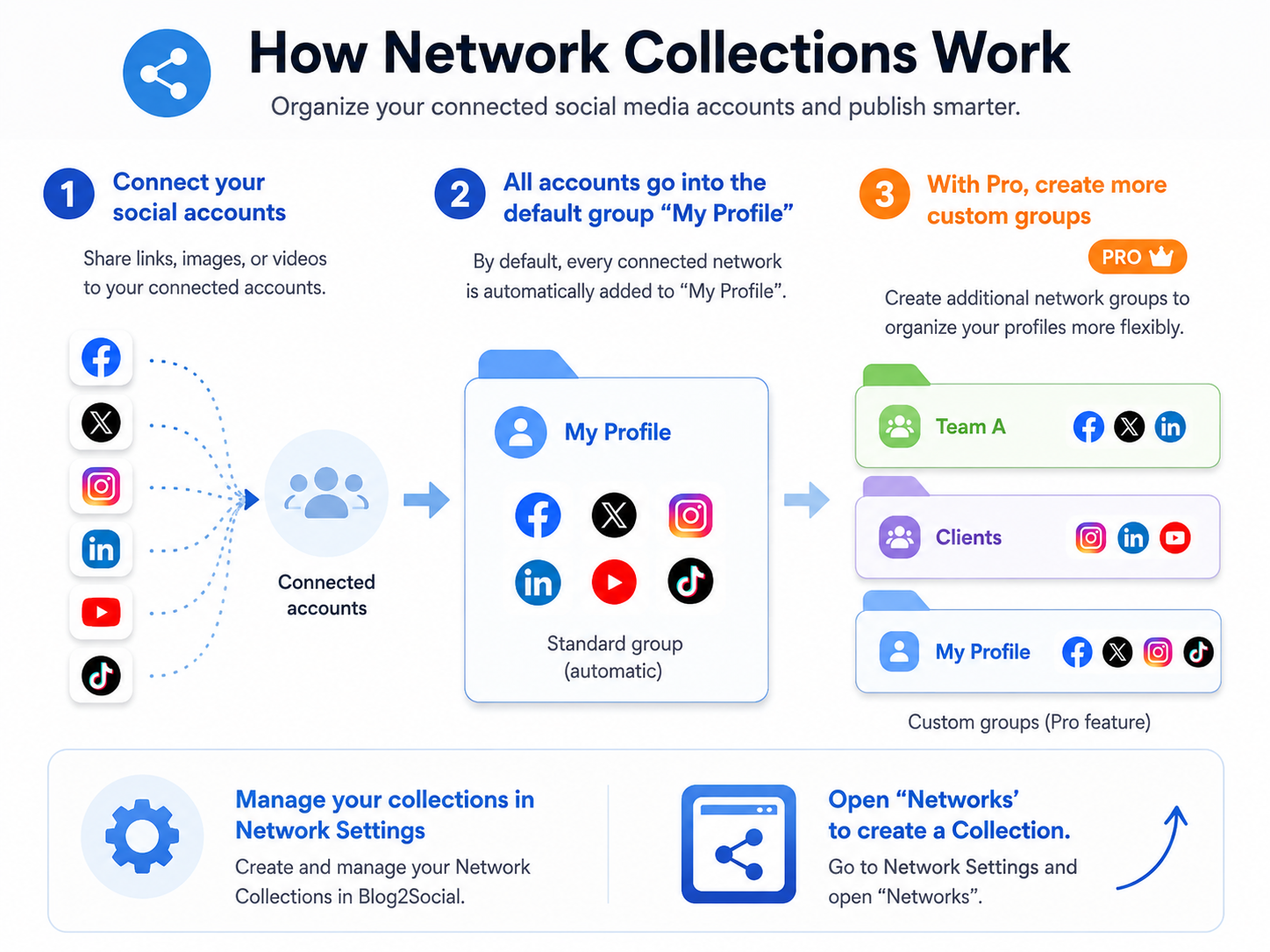
In the Network Settings you can define one or more network selections for your posts.
Select image
What is a Link Post / Image Post?
Scheduled posts
Load draft
Network collections
Delete entries from the reporting
(Number of entries: )
Delete entries from the scheduling
(Number of entries: )